
Turn messy bank statements into clean Excel files
Upload a PDF, scan or phone photo. BankPDF turns every transaction into a clean, import-ready Excel file.
Bank statements
Any bank · scan · photo
Excel output
| Date | Description | Amount |
|---|---|---|
| 2026-06-03 | Client payment | 2,500.00 |
| 2026-06-04 | Software expense | -89.00 |
| 2026-06-05 | Office supplies | -126.35 |
| 2026-06-06 | Subscription | -39.00 |
| 2026-06-08 | Bank fee | -12.00 |
Extracted · 148 transactions
10 free pages to test · no credit card
Any bank
Local or global, scanned or digital.
Scans & photos
PDFs, JPGs and phone photos.
Excel + accounting
Import-ready for the tools you use.
99.99% accuracy
Field-checked on real statements.
Works with statements from banks worldwide





























Every row, column, and bank
— encoded and normalized.
Other tools drop rows, lose columns, and garble text — especially at smaller banks. BankPDF returns every transaction in one clean structure:
What other converters return
Rows dropped, columns lost, encoding and dates all over the place.
| Date | Description | Amount |
|---|---|---|
| 6/3/26 | SEPA TRANSFËR | $2,500.00 |
| 03-06-2026 | CARD PURCHASE | EUR -89,00 |
| Jun 5 | SERVICE PAYMÉNT |
What BankPDF returns
Every transaction, from any bank, in the same clean structure.
| Date | Description | Amount |
|---|---|---|
| 2026-06-03 | SEPA transfer | 2,500.00 |
| 2026-06-03 | Card purchase | -89.00 |
| 2026-06-05 | Service payment | -126.35 |
| 2026-06-06 | Maintenance fee | -39.00 |
Three steps from PDF to Excel
Upload the statement, let BankPDF organize every transaction, then download a clean Excel file.
- + many more
01 — Upload the statement
Start with the PDF you already have
Drag in the PDF from your bank or client. BankPDF accepts digital statements, scans and phone photos.
- Extracting date periodIdentifying tablesNormalizing dates, amounts and descriptionsAuto-correctingFinalizing
02 — AI extraction
The details are organized automatically
BankPDF identifies dates, descriptions, debits, credits and balances, then structures them into spreadsheet rows.
Your Excel files

chase-january.xlsx
boa-february.xlsx
scanned-client.xlsx
revolut-march.xlsx
wells-fargo-q1.xlsx
03 — Download Excel
Download a clean Excel file
Get a structured spreadsheet that is ready to import straight into the tools you already use.
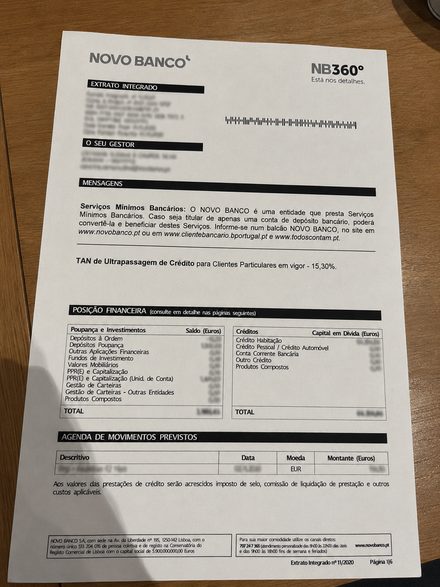
Send a picture. Get an accurate Excel file.
Snap a photo of a bank statement on your desk. BankPDF scans the image, finds every field and turns it into a clean Excel file.
- Works with phone pictures, JPG and PNG files
- Reads bank statements automatically
- Structures dates, descriptions, totals and amounts
- Creates an accurate Excel file ready to review
AI scanning
scanned-data.xlsx
| Date | Description | Amount |
|---|---|---|
| 2026-06-01 | Deposit | 980.00 |
| 2026-06-02 | Card payment | -72.10 |
| 2026-06-03 | Maintenance fee | -12.00 |
| 2026-06-04 | SEPA transfer | 600.00 |
Send clean Excel into the accounting tools you already use
BankPDF formats the spreadsheet so it imports straight into your accounting software — no cleanup or reformatting on your side.
Client PDFs
BankPDF
- Dates normalized
- Descriptions cleaned
- Amounts & balances structured
- Formatted to import cleanly
Accounting software



…and any tool that imports Excel, CSV or QIF
99.99%
Reliable enough for real accounting work
“I have used BankPDF for almost a year. It has processed over a thousand documents for us and only failed twice.”
Protected document
statement.pdf
Your statements stay protected from upload to download
Bank statements are sensitive financial documents. BankPDF is built around encrypted processing, controlled access and GDPR-conscious file handling.
Encrypted file handling
Uploads and converted files are handled as sensitive financial data.
Only you can download the result
Converted files are reachable only from your account.
GDPR-conscious processing
Your files are available for 3 days, then deleted automatically.
Bring statement conversion into your own process
Use the BankPDF API when conversion needs to sit inside an existing product or operational workflow.
Send the document through your system and receive structured output that continues to the next step.
Contact the BankPDF team to discuss your workflow.
// 1 · upload the statement
POST /api/v1/upload
Content-Type: multipart/form-data
[email protected]
→ { "fileId": "cuid_8kd2f0" }// 2 · poll until complete
GET /api/v1/status/cuid_8kd2f0
→ {
  "status": "completed",
  "downloadUrls": {
    "standard": "https://…/statement.xlsx",
    "quickbooks": "https://…/statement-quickbooks.xlsx"
  }
}
Excel ready to download
Saves us hours every single month
“Our clients hand us PDFs—scanned or straight from their banks. We upload to BankPDF, it converts to Excel, and we import directly into TOConline. What used to take hours is done in seconds.”
Daniel Nunes
CPA · Porto
Client statement folder
Scanned and digital PDFs
BankPDF conversion
Transactions structured automatically
Imported into TOConline
Clean data, no manual fixes
Pay for the volume you actually process
Choose a monthly page allowance that matches the number of statements you convert.
Grow
Designed for consistent use.
$ 49.90 / month
Get startedWhat's included:
- Convert up to 300 pages/month
Need a different plan? Contact us
Try BankPDF with confidence
If you are not completely satisfied, we will refund your money.
Frequently Asked Questions
Everything you need to know about BankPDF and its bank statement converter features.
Still need help?
[email protected]How does BankPDF work as a bank statement converter?
Can I convert PDF credit card statements to Excel with BankPDF?
Does BankPDF support the conversion of scanned PDF bank statements?
Which banks are supported by BankPDF?
Is my data secure with BankPDF?
Do you offer customer support?
Put one statement through BankPDF
Upload a PDF, scan or photo from any bank and turn it into a clean Excel file ready for the work ahead.
- Scans & photos
- Multiple files
- 99.99% accuracy
Questions? [email protected]